KStudio.Creative & business solutions
Contact

A little help for your small business

Let’s make
work easier.

I build custom tools, practical websites, and simpler workflows for U.S.-based small businesses. Tell me what’s taking too much time, and we’ll find a better way to handle it.

Built around how you work.
Rose glass and tapered chrome forming an infinity loop
Websites and contentTools for your teamHelp with everyday workflows

How I can help

What’s taking up
your time?

Maybe it’s a spreadsheet you dread opening, a website that needs attention, or content you keep putting off. That’s a good place to start.

Custom tools & automation

Less manual work. More room to think.

I build checks, calculators, dashboards, and connected workflows around the way your team works. Useful when you’re comparing spreadsheets, rebuilding reports, or copying the same information between apps.

Audit checks · Reconciliation · Calculation support · Retro reviews · Team dashboards · Onboarding & follow-ups
Websites

A website you’re happy to share.

Explain what you do, show your work, and make it easy for people to get in touch. I can build a new site or help your current one work better.

Business websites · Landing pages · Website refreshes
Content & marketing

Find the words. Make a plan.

From website copy and social posts to launch campaigns and email marketing, I’ll help you put your ideas into words and work out where to share them.

Website copy · Social content · Brand storytelling · Campaign & content planning · Email marketing

Some examples

Here’s what
that can look like.

These sample projects give you a feel for the kind of work I can help with. Open one and have a look around.

TOOLS + DASHBOARDS SAMPLE

A tool for checking the numbers.

Compare two fictional invoice datasets and see matched records, amount differences, duplicate IDs, and missing entries.

CONTENT + MARKETING SAMPLE

A coffee shop’s launch kit.

A coffee-house content package with branded social concepts, captions, and a welcome email.

WORKFLOW AUTOMATION SAMPLE

Keep track of new inquiries.

Step through an inquiry workflow that organizes a lead, prepares a reply, and queues a follow-up.

WEBSITE DESIGN SAMPLE

A home for a local business.

Explore a service-business website concept, from its first impression to a clear inquiry path.

These are sample projects with fictional data, not past client work.

Templates

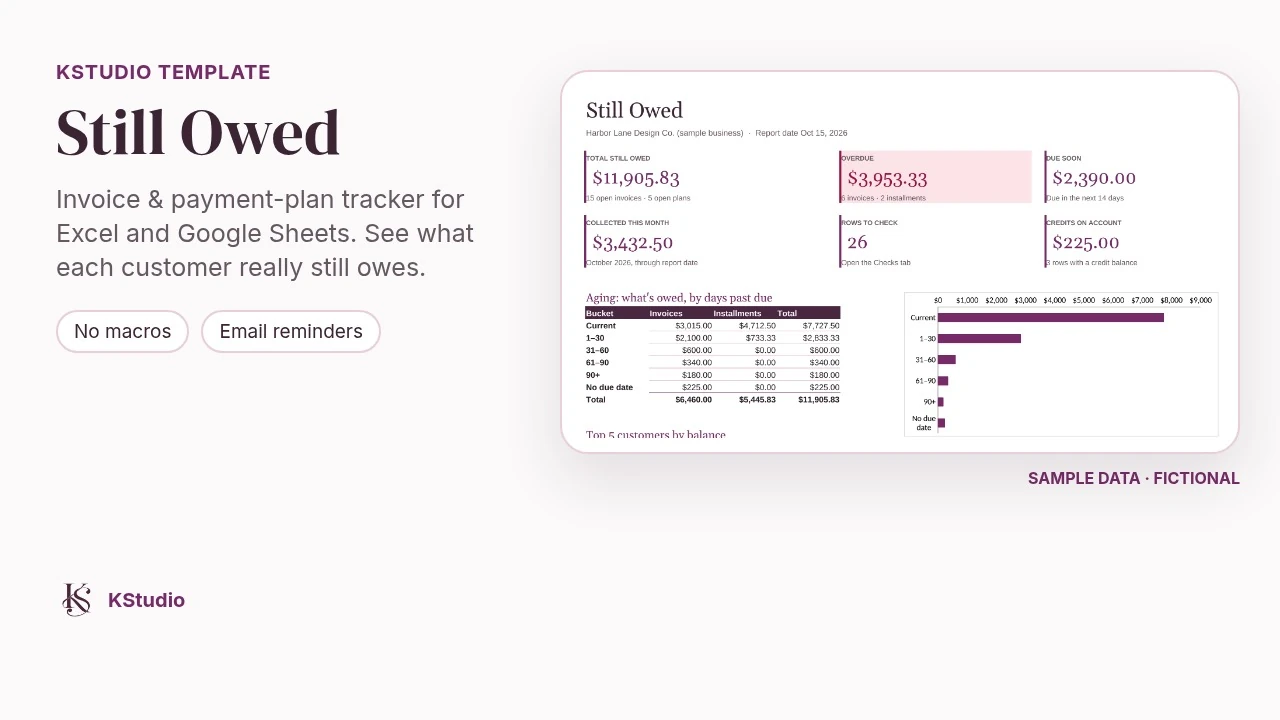
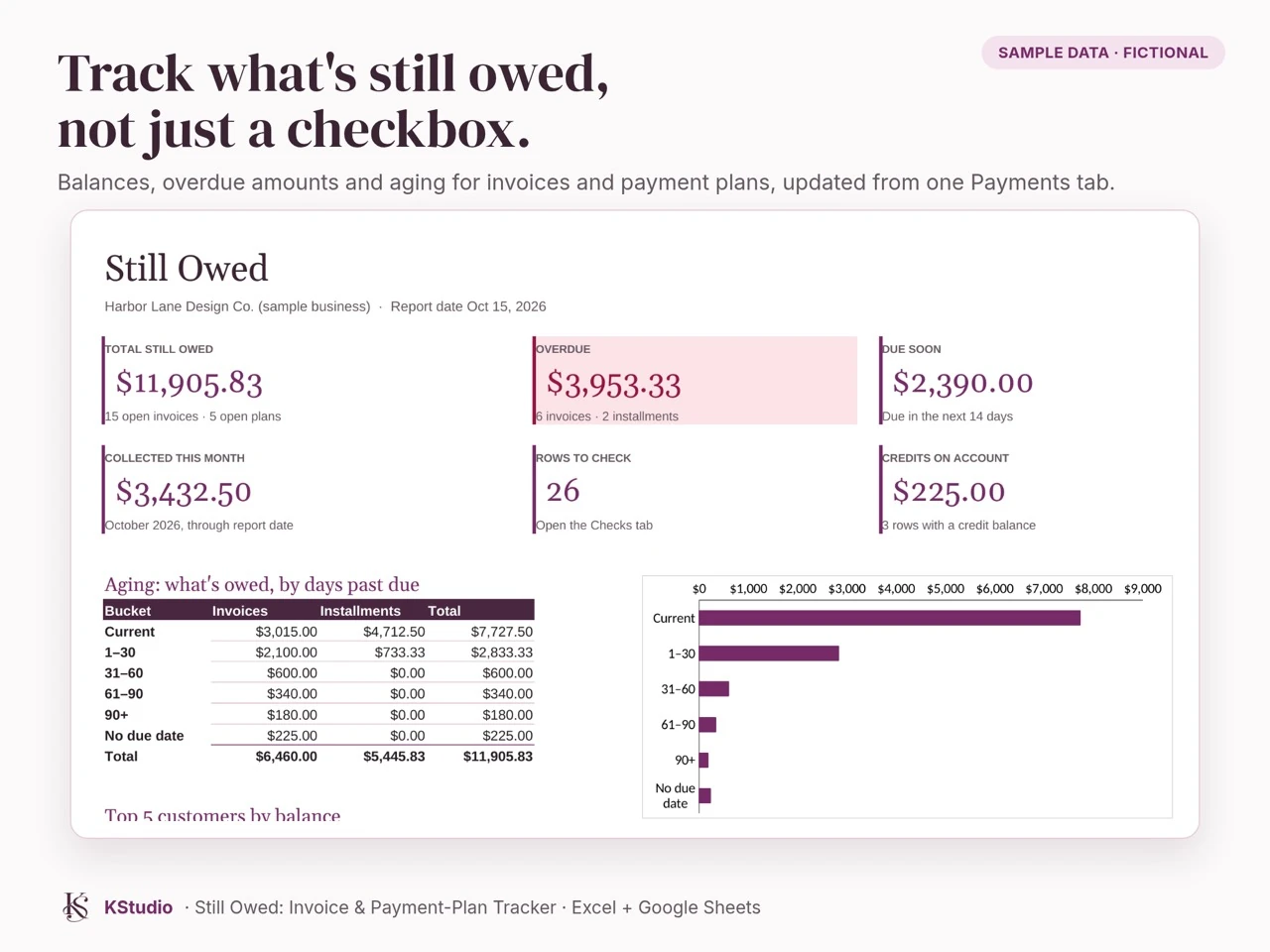
Still Owed invoice tracker coverStill Owed dashboard showing balances and aging

Still Owed: Invoice & Payment-Plan Tracker

Your sheet says PAID. Your customer still owes $300.

Still Owed is a simple spreadsheet for small businesses that invoice customers or offer payment plans. Enter invoices and payments once, and it shows what's actually outstanding, what's overdue, and which rows need a second look before you send anything.

  • Real balances for every invoice and payment plan
  • Installment schedules that add up to the exact total, cent for cent
  • Dashboard with overdue, due soon, aging and top customers
  • 32 built-in checks that catch common billing mistakes
  • Pre-written, professional payment reminder emails
  • Printable one-page customer statements
  • Works in Excel (Windows and Mac), Google Sheets and LibreOffice. No macros or add-ons
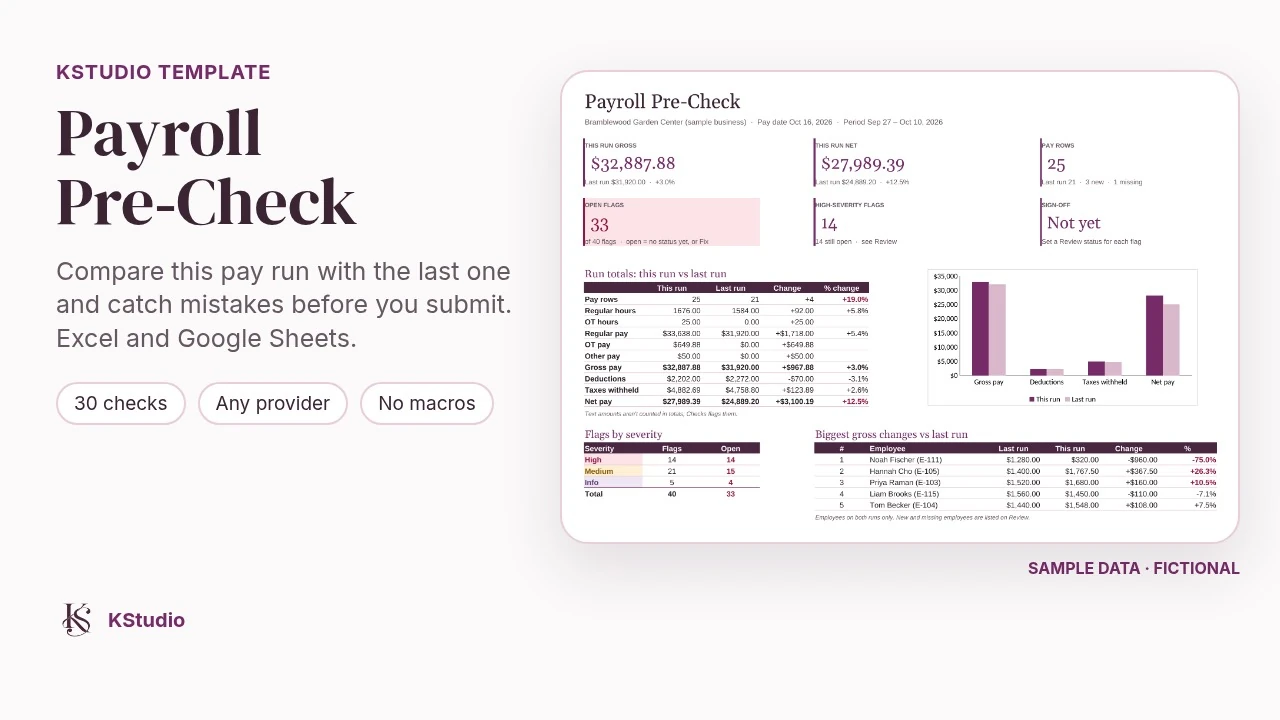
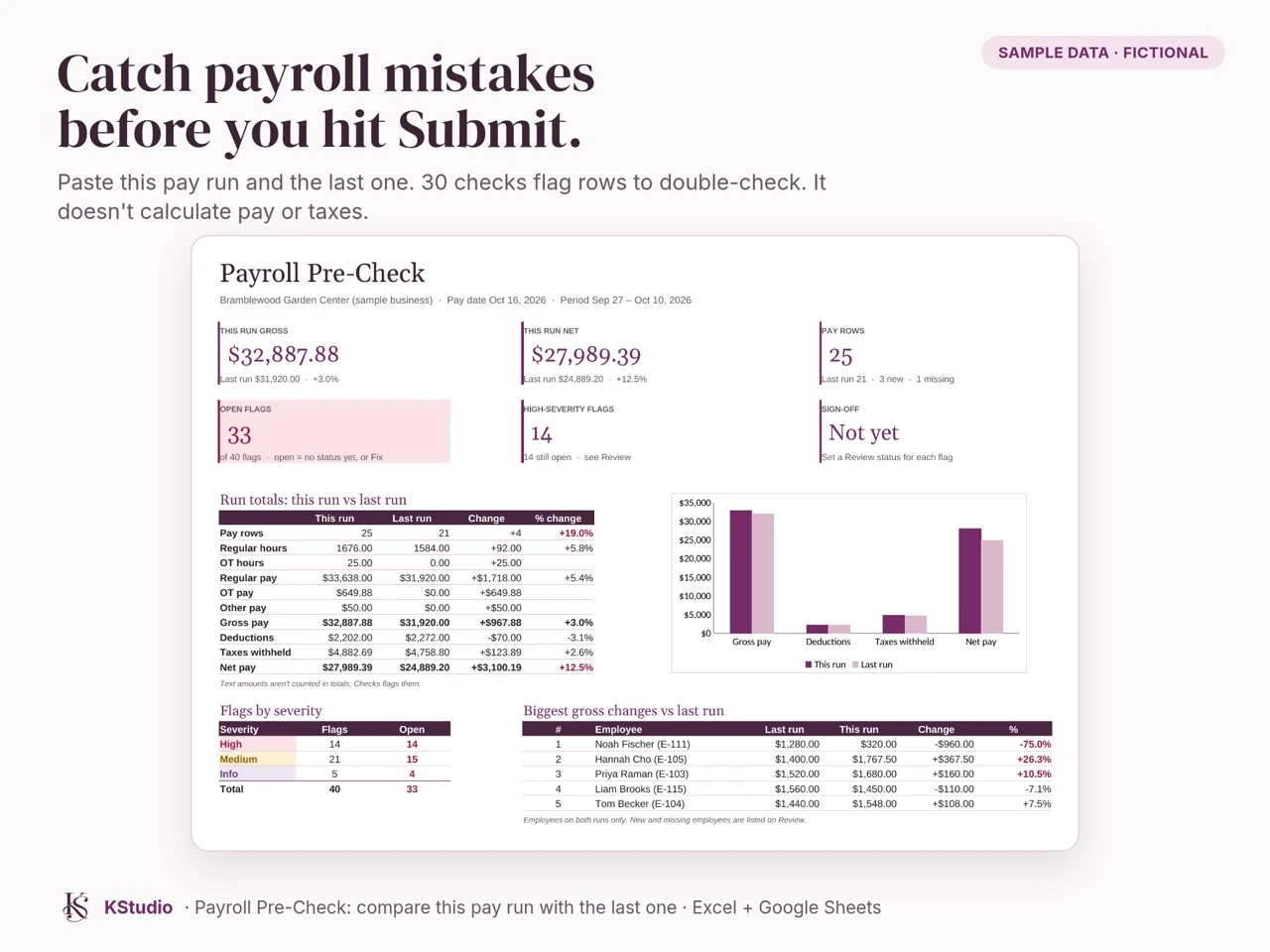
Payroll Pre-Check workbook coverPayroll Pre-Check dashboard showing pay run comparisons and flagged items

Payroll Pre-Check

Catch payroll mistakes before you hit submit.

An Excel workbook that compares this pay run to your last one and flags anything that looks off before payroll goes out: missing employees, big pay swings, unusual hours, duplicate payments, deductions that changed, and more (30 checks in all). Import the payroll report you already run from Gusto, QuickBooks Online Payroll, ADP RUN, Paychex Flex, OnPay, Square Payroll or Patriot, or map columns from almost any other system. No macros, works offline in Excel.

  • 30 automatic checks with a one-page dashboard
  • Import presets for 7 popular payroll providers
  • Step-by-step User Guide (PDF) with screenshots
  • Example workbook with sample data to practice on
  • One business license: store it on your shared drive for your team

Planning your project

A starting point
that fits you.

You don’t need a finished plan to get in touch. We’ll talk through what you need, what you already have, and when you’d like it ready. Then I’ll work out the scope, time involved, and a quote just for your project.

Start with one thing that’s slowing you down.

You don’t need a complete redesign. We can begin with one recurring problem and agree on a manageable first step.

Spreadsheet cleanup and checks

Make a recurring workbook easier to use and catch common mistakes.

Workflow review

Map one repetitive process and identify practical improvements.

Website refresh

Improve key pages and make the next step clearer for visitors.

Discuss a starting point

A clear plan before we begin.

Your proposal will spell out the finished files or tool, any instructions or walkthrough, included revisions, and any software or hosting costs. Ownership and access arrangements will be agreed before work begins.

Ongoing support is scoped separately. We’ll agree on changes to the scope, cost, or timeline before extra work begins.

Meet Katie

I’ve been on
the other side.

Hi, I’m Katie. I started building tools to help my own team with payroll audits, calculations, retro reviews, and reconciliation. The manual checks could take hours or days, so I began looking for ways to make the work easier.

Based in Japan, serving U.S.-based small businesses.

That’s the thinking behind KStudio. I like getting to know how something works, finding the frustrating parts, and making something useful. I use a mix of design, code, and AI where it helps, with my own review throughout.

Connect with Katie on LinkedIn
  1. 01

    Tell me what’s getting in the way.

    We’ll talk through what you need and how you’re handling it now.

  2. 02

    Agree on a starting point.

    We’ll decide what to build, what’s included, and what I’ll need from you.

  3. 03

    Try it out together.

    You’ll have a chance to review the work, ask questions, and get comfortable using it.

A few things you might be wondering

Before we
get started.

Can you work with the tools I already use?

That’s where we’ll start. Tell me which apps, spreadsheets, or website platform you use. I’ll check what can connect and explain any limits before suggesting a change.

What if I’m not sure what I need?

Tell me what feels slow, repetitive, or frustrating. We can talk through the problem and choose a manageable first step before agreeing on the work.

What happens when the project is finished?

We’ll agree on what you receive and how it’s handed over in your quote. That includes any walkthrough, instructions, access, or ongoing costs you’ll need to use it.

Can you help with changes later?

We can include support in the original scope or quote it separately when you need it. New features and ongoing maintenance are agreed work, so you’ll know what’s covered.

How do we work across time zones?

I’m based in Japan. We can use written updates and recorded walkthroughs, with calls arranged at a time that works for both of us.

How will data access and AI use be handled?

Before any project needs access to business systems or data, we’ll agree on what information is needed, who can access it, whether AI services will process it, and how access will end. Please use fictional or anonymized examples when first getting in touch.

Get in touch

Have something
in mind?

KStudio focuses on remote projects for U.S.-based small businesses. Tell me a little about your business and what you have in mind. You don’t need a finished plan to start a conversation.

I’ll review what you share and identify any questions we need to work through. We’ll agree on the scope and quote before project work begins.

Add more project details (optional)

Your details are saved privately so Katie can review your request and respond. Please leave out passwords, employee records, and other sensitive information. An agent may help organize and summarize your request for Katie. How your information is used.